Neuro Vision TFT Getting Started
The Neuro Vision TFT carrier with the OV5640 camera, an 800x480 LCD with capacitive touch, a speaker, the strobe LED and time of flight sensor, and the TFT-W variant with the wireless module.
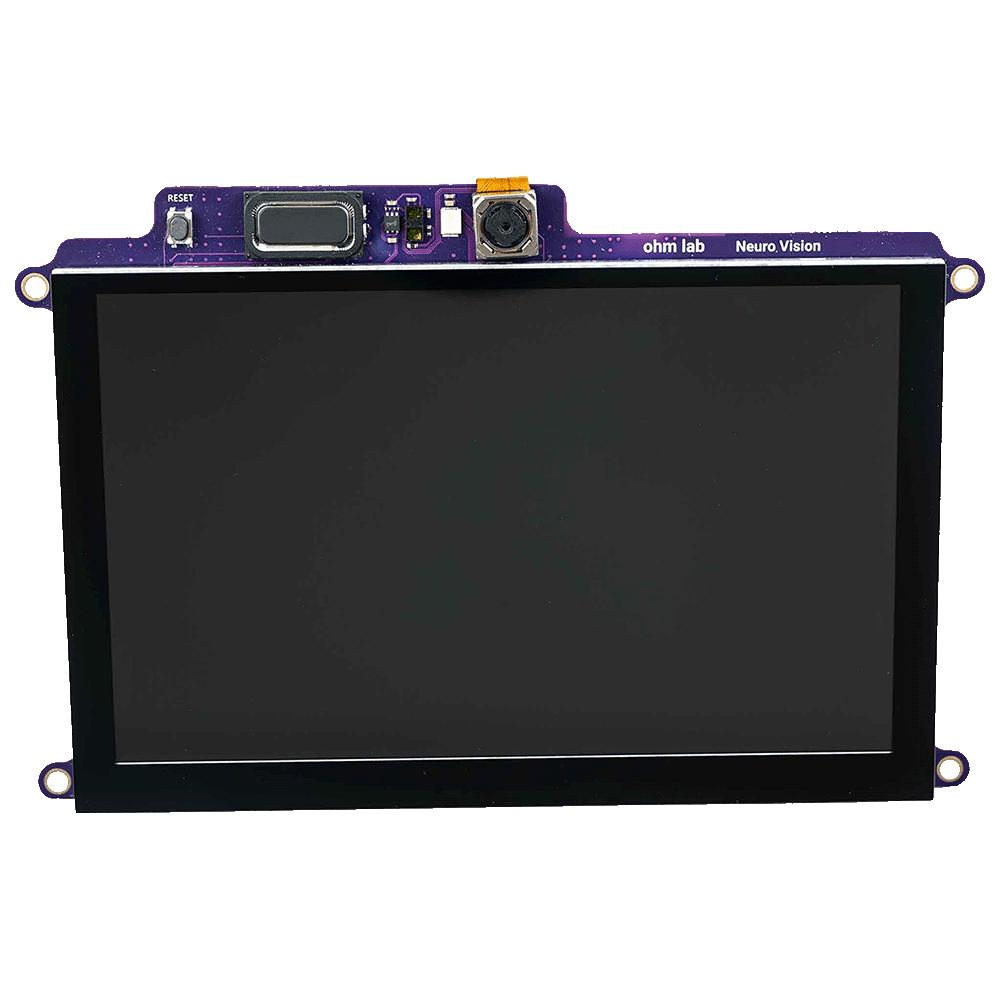
The Neuro Vision TFT is a carrier for the Neuro N6 that mounts the OV5640 camera module together with an 800x480 colour LCD, a Goodix GT911 capacitive touch controller and a speaker driven by a MAX98357A amplifier. Like the Neuro Vision OV5640 it carries the strobe LED and a VL53L1CB time of flight sensor. It is the only carrier family with a display, and it allows a sketch to show the camera image and model results with no computer attached. The Neuro Vision TFT-W is the same carrier with a u-blox MAYA-W476 WiFi and Bluetooth LE module added.
Specifications
| TFT | TFT-W | |
|---|---|---|
| Camera | OmniVision OV5640, 5 MP, autofocus. Carrier wires the CSI lanes inverted | Same |
| Display | 800x480 LCD on the 16-bit RGB565 LTDC interface, two layers: camera and ARGB4444 overlay | Same |
| Touch | Goodix GT911 capacitive, up to five points, on the module I2C bus at 0x5D or 0x14 | Same |
| Refresh | 30 to 60 Hz, following the camera frame rate under TRANSPORT_LCD | Same |
| Speaker | MAX98357A I2S class D amplifier on SAI1 with a speaker | Same |
| Strobe LED | On the sensor strobe output | Same |
| Time of flight | ST VL53L1CB, 4x4 zones | Same |
| Wireless | None | u-blox MAYA-W476, WiFi 2.4 GHz and Bluetooth LE |
| Part number | OL-DEV-N6-006, hardware revision A | OL-DEV-N6-007, hardware revision B |
The inertial unit, magnetometer and microphone are on the Neuro N6 board itself.
Fitting
The carrier mates with the two board-to-board connectors on the Neuro N6 with the board unpowered. The display faces away from the Neuro N6.
In a sketch
Both variants are declared with the carrier argument:
#include <OV5640_Arduino.h>

OV5640 camera(CARRIER_TFT);
The argument records the inverted CSI lane wiring and enables the display. Declaring a plain OV5640 camera; on this carrier produces no frames.
The ObjectSegmentationDisplay example, under File > Examples > NeuroN6Examples > 03.NeuralNetwork, runs segmentation and draws the result on the panel. cfg.transport = TRANSPORT_LCD selects the panel as the output. See The On-board Display.
Display
The camera image is written to the panel continuously by hardware and is double buffered, so it does not tear. Post-processors draw boxes, masks and skeletons on the overlay layer above it, and a sketch can draw its own graphics there with the ohmlab_lcd_draw primitives. The panel shows WVGA (800x480) at full size and VGA centred with bars; larger camera modes are for USB streaming and switch the panel off.
The panel can also mirror the image while video streams to a host, with cfg.lcd = true.
Touch
The GT911 library reads up to five touch points and provides pressed() and clicked() rectangle tests, so an on-screen button is a drawn rectangle and a test against the same rectangle. The default coordinate mapping is correct on this carrier. See Touch Input.
Speaker
The Speaker library plays tones and streams 16-bit mono PCM through the amplifier. See Speaker.
Wireless (TFT-W)
The MAYA-W476 provides WiFi video streaming and Bluetooth LE. The WiFiAccessPoint example runs an access point, a BLE peripheral, the camera, the panel and the speaker together. See WiFi.
Examples for this carrier
| Example | Library | Requires |
|---|---|---|
| CameraOptions, ObjectDetectionDisplay, ObjectSegmentationDisplay | NeuroN6Examples | TFT or TFT-W |
| QrReaderDisplay | Quirc | TFT or TFT-W |
| BlobTrackerDisplay | N6Imgproc | TFT or TFT-W |
| FaceRecognition | FaceID | TFT or TFT-W |
| CalibrateTouch | GT911 | TFT or TFT-W |
| SpeakerTone, SpeakerClip | Speaker | TFT or TFT-W |
| AudioSpectrum, AudioWaterfall | N6Audio | TFT or TFT-W |
| AudioEventDetectionDisplay | N6AudioAI | TFT or TFT-W |
| WiFiAccessPoint | MayaW476 | TFT-W |